how-to
QR Code for Google Reviews: Use Google's Free One
How to get the free review QR code from your Google Business Profile, where to print it, the two rules that get reviews removed, and when to count scans per spot.
Read More →How to get the QR code Instagram gives every profile, when it is enough, and how to make your own that counts scans per spot and can point somewhere new later.
Instagram already made you a QR code. It is free and it lives in your profile. If you print it once and never need to know how many people scanned it, stop there. If you want scan counts per spot, or a destination you can change, here's how to make a dynamic QR code.
Per Instagram's help article "Find and customize the QR code of your Instagram profile" (checked again on 28 October 2026), the steps are the same on iPhone and Android:
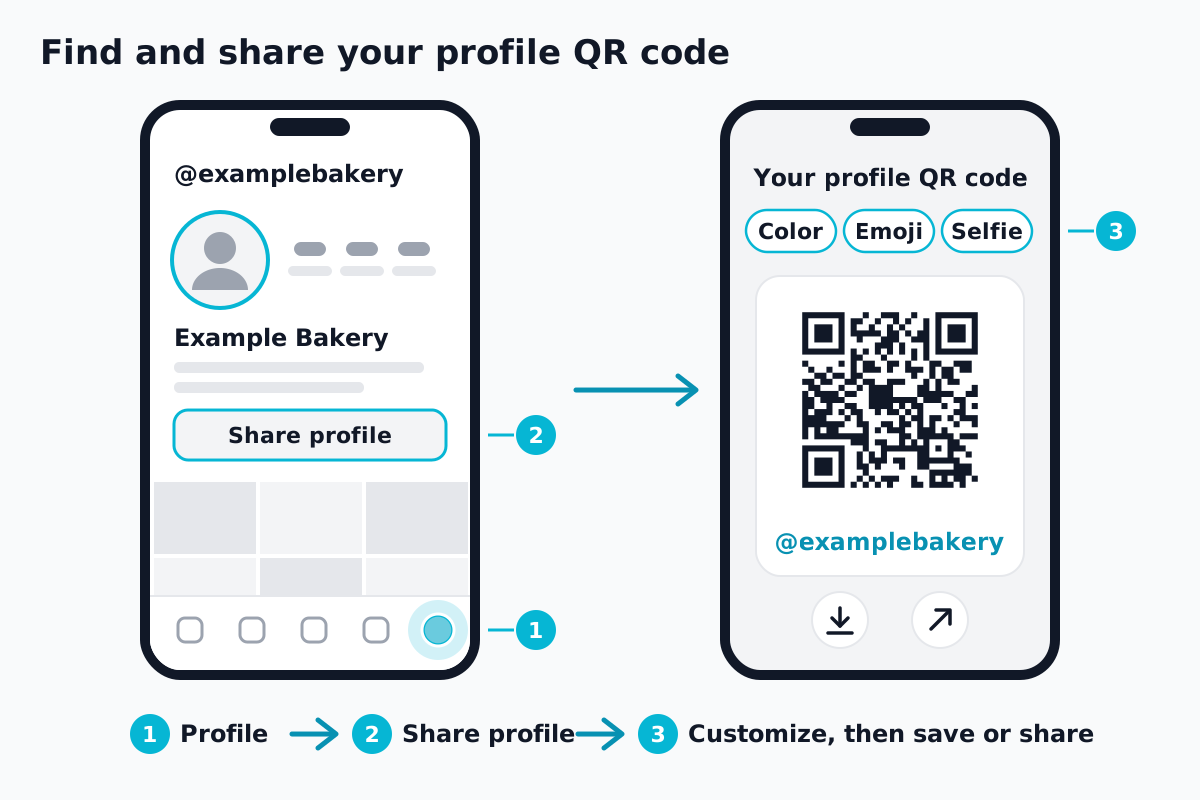 Illustration, not a screenshot. Steps from Instagram's help page.
On a computer:
The same article notes that you can't log in to Instagram with a QR code. It's for sharing your profile, nothing else.
It's enough when all you need is "scan to find us on Instagram", you print it once, and you never care how many people scanned it or from where. A cafe sticker, a market stall sign, a name tag.
You can also make a plain code yourself with our free QR code generator: choose URL, paste https://www.instagram.com/yourhandle, download PNG or SVG. No account. It works as long as that handle exists, so if you ever rename the account, check where the old link goes before you reprint.
Either way, the code goes straight to Instagram. Nothing sits in between, so there is nothing to count. Instagram's help article for its own code doesn't mention scan counts, either.
Three cases where a code of your own in between helps:
If none of these fits, stay with Instagram's code. It costs nothing and has no extra step.
https://www.instagram.com/yourhandle as the Default URL, and select Continue. Then Continue to Customize and Create QR Code.window or receipt, select Create Channel, and use Copy to get that placement's link. Turn each link into its own printed code with the free generator.What to know before you print:
For what the scan counts mean, see how to track QR code scans. A code that changes after printing is what dynamic QR codes do, and shops and cafes are covered under QR codes for business.
Does Instagram have its own QR code? Yes, one per profile, in the app. Instagram's help article calls it a way to help other people find your profile.
Can I use a QR code to log in to Instagram? No. Instagram says you can't log in with one.
Will a QR code I make myself stop working if I change my username? A link with your handle in it points at that handle. After a rename, check what the old link does. With a QRZY code, you change the Default URL once and every printed code follows.
No sign-up. To change the destination later, QRZY's Free plan gives one editable code with a 5-second countdown on every scan. Per-spot counts start on Starter.
How to get the free review QR code from your Google Business Profile, where to print it, the two rules that get reviews removed, and when to count scans per spot.
Read More →How to make a QR code for a link or website, free: in Chrome, Edge, on your phone, with a free generator, or as a dynamic code you can change later.
Read More →A location QR code is a QR code of a map link. How to build a Google Maps link that opens the app on any phone, and how to point one code at a different spot each day.
Read More →