how-to
QR Code for Google Reviews: Use Google's Free One
How to get the free review QR code from your Google Business Profile, where to print it, the two rules that get reviews removed, and when to count scans per spot.
Read More →A location QR code is a QR code of a map link. How to build a Google Maps link that opens the app on any phone, and how to point one code at a different spot each day.
A location QR code is a normal QR code that holds a map link. Scan it and the phone opens the map at your spot. The code is the easy part, the link is the work. If your spot moves, a dynamic QR code can send people somewhere different each day.
Ask what the person scanning needs to do when the map opens.
Google's help page "Share a map or directions" (checked again on 28 October 2026) gives the steps for a computer and for the app.
On a computer: open Google Maps, go to the place, click Menu, then Share or embed map, Send a link, Copy link.
In the Google Maps app: search for the place or drop a pin. Tap the place's name or address at the bottom, tap Share, then choose where to send it. Copy the link from there. The steps are the same on Android and iPhone.
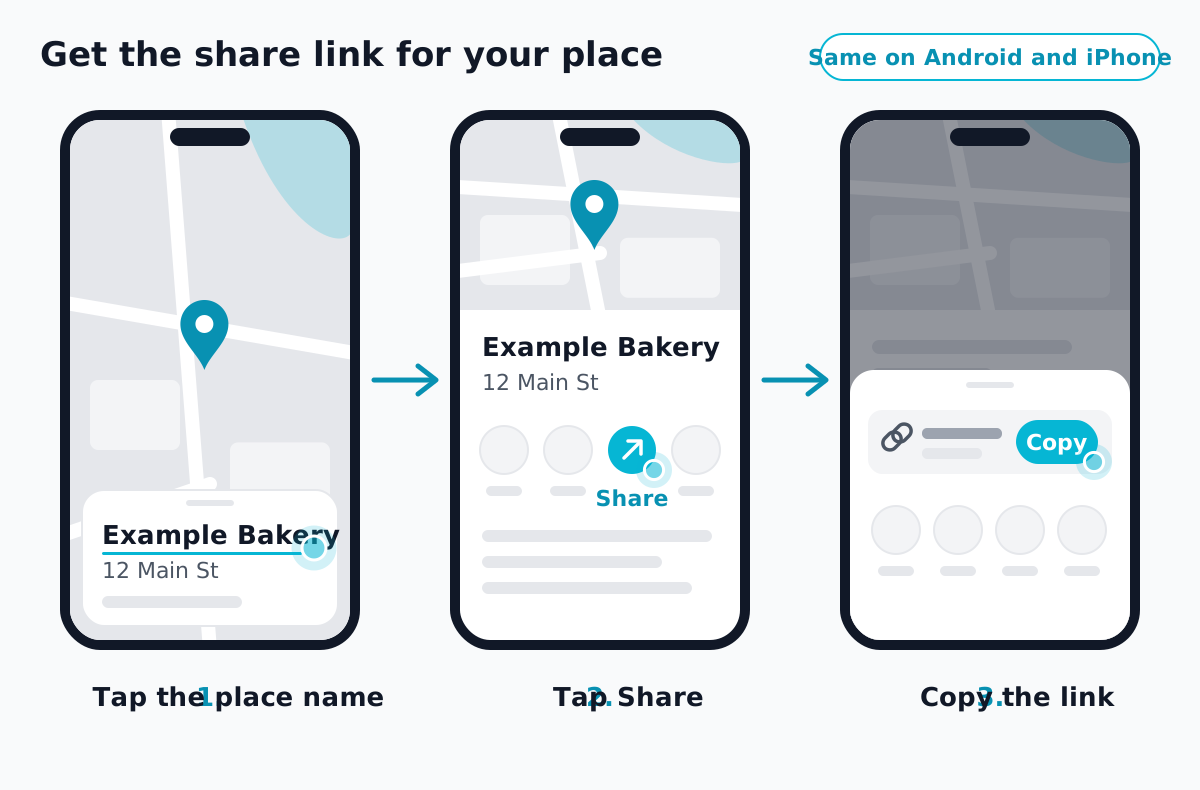 Illustration, not a screenshot. Steps from Google's Maps help.
Look at the link you copied. If it is a short one starting maps.app.goo.gl, it works in any free QR generator, but not in QRZY's dynamic QR codes. See below.
Google publishes a link format for exactly this case, in its Maps URLs documentation. It's long, but every part of it is readable:
https://www.google.com/maps/search/?api=1&query=Your+Business+Name+Your+Street+Your+City
Put a place name, an address or coordinates after query=, with + instead of spaces. For directions, swap search for dir and query for destination:
https://www.google.com/maps/dir/?api=1&destination=LATITUDE,LONGITUDE
Replace LATITUDE,LONGITUDE with the coordinates of your spot (how to get them is below).
What happens on scan, per the same documentation: on Android and on iPhone, the link opens in the Google Maps app if it's installed. If it isn't, Google Maps opens in the browser. On a computer it opens in the browser.
Per Google's help page "Find or enter latitude & longitude": on a computer, right-click the spot on the map. The coordinates appear at the top of the pop-up, in decimal format. Click them to copy. Paste them after query= or destination= above.
If the place never moves, a static code is all you need. Paste the link into our free QR code generator as a URL, download PNG or SVG, done. No account, and the code works for as long as the map link does. Our guide on making a QR code for a link has the details on size and testing.
Scan it with two different phones before you print. A map link with a typo still opens a map, just the wrong one. If a phone won't read the code at all, see why a QR code isn't scanning.
A food truck at the office park on Tuesday and the farmers market on Saturday. A pop-up that changes street every month. A festival that's in the park this year and the harbor next year. A code on the side of a truck stays there for years, and reprinting it for every stop isn't practical. A code you can change after printing fixes that.
A dynamic QR code holds a short QRZY link, and you decide in the dashboard where that link sends people, including by day of the week. The food truck page shows the idea in full.
This works on the Free plan:
Steps are checked top to bottom, and the first one that matches wins. Time of Day (Hours) works the same way if the truck moves at lunch, and Time Range (Between Dates) handles a one-off event.
What to know before you print:
google.com/maps link. QRZY blocks known URL shorteners as destinations, and maps.app.goo.gl falls under goo.gl. The long format above works.For a code that lives on a vehicle, QR codes on vehicles covers size and placement. The dynamic QR codes page explains what else you can change after printing.
Can I make a QR code for my current location? Yes. Get the coordinates of the spot and build a link with them. The code points to that spot, not to wherever you go next.
Will it open Apple Maps on an iPhone? A Google Maps link opens Google Maps: the app if it's installed, otherwise Google Maps in the browser. Apple Maps has its own links, but this guide doesn't cover them.
Does a location QR code track the person scanning? The code itself holds only a link. A QRZY dynamic QR code records each scan: the time, the country and city from the network, and the device and browser. It never asks the phone for its GPS position.
{ "Free plan": "one editable code, day and time rules, 5-second countdown on every scan." }
How to get the free review QR code from your Google Business Profile, where to print it, the two rules that get reviews removed, and when to count scans per spot.
Read More →How to get the QR code Instagram gives every profile, when it is enough, and how to make your own that counts scans per spot and can point somewhere new later.
Read More →How to make a QR code for a link or website, free: in Chrome, Edge, on your phone, with a free generator, or as a dynamic code you can change later.
Read More →