how-to
QR Code for Google Reviews: Use Google's Free One
How to get the free review QR code from your Google Business Profile, where to print it, the two rules that get reviews removed, and when to count scans per spot.
Read More →How a vCard QR code works, what to put in it, and why it can't change after printing. Make a free one, or use an editable contact page if your details will change.
A vCard QR code puts your name, number and email on a card, and one scan offers to save them to the phone. Change your number later and every card you handed out is wrong. The fix is a dynamic QR code that opens a contact page you can edit.
A vCard is a small text format for contact details, the same one phones use when you share a contact. A vCard QR code holds that text itself. A version with name, phone and email looks like this inside (the number is a made-up one):
BEGIN:VCARD
VERSION:3.0
N:Novak;Ana;;;
FN:Ana Novak
TEL:+15550100199
EMAIL:ana@example.com
END:VCARD
The vCard standard (RFC 2426) asks for both an N and an FN name line. Our free generator currently writes only FN, so what it produces is a shorter version of this.
Because the details are in the code, the phone doesn't need the internet to read them. It also means the details are fixed the moment you print.
Every field adds text, and more text means a denser code with smaller squares. Dense codes need to be printed bigger to scan reliably, and a business card has no room for bigger.
A sensible set for a card: name, phone, email. Add company and website if they matter. Leave the street address and long job titles for the printed card itself, where people can read them without scanning.
More fields make a denser code with smaller squares, as the two codes below show, so keep a printed vCard code short or print it larger.
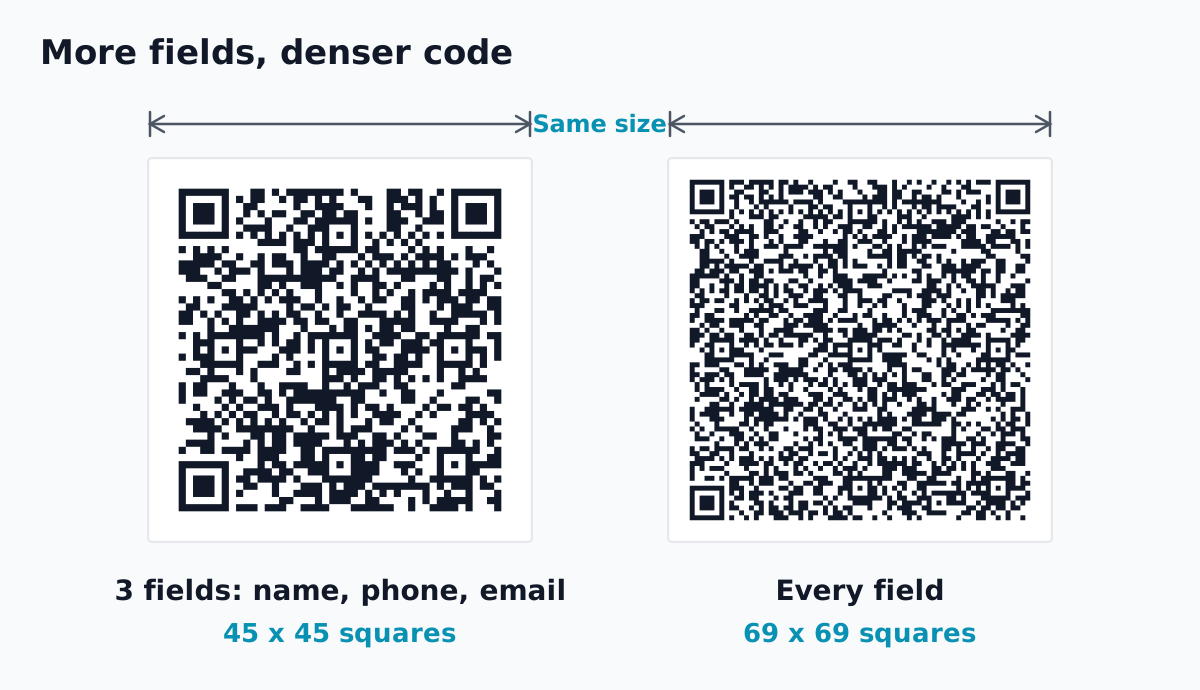 Both codes are real and scannable. Same size, more fields, smaller squares.
Our QR code size guide has the minimum sizes. For a card held in the hand, 2 x 2 cm plus a white border is the floor, but the guide says that size only holds for codes with very little data. A vCard holds more, so expect to need a larger code, and test it. If a dense code won't scan, see why a QR code isn't scanning.
Our free QR code generator makes vCard codes with no sign-up:
That code works for as long as your details stay the same. No account, nothing to renew.
Details change. New number, new job, new email address, a company rename. A static vCard keeps the old details forever, in every card already handed out. The fix is a reprint, and the old cards keep spreading the wrong number.
If that's likely in the next year or two, put a code on the card that opens a contact page instead. The page has a Save contact button that does the same job as a vCard code, and you can edit the page whenever something changes. The cards in people's wallets stay right, as long as the code stays live. If a paid plan ends, one code of your choice stays live and the others pause until you upgrade again. A contact page is a small landing page, and what to put on a QR code landing page covers the rest.
Scan or open our demo to see one: go.qrzy.co/demopage. It's a made-up person's card with a name, title, email, phone, website and the Save contact button.
Contact pages are hosted pages, a Pro feature ($250 a year, 5 pages).
When something changes, edit the page. The next person who scans gets the new details.
Trade-offs:
QRZY itself started with a business card with the wrong QR code. For more on cards, see QR codes on business cards. Dynamic QR codes explains the editable kind in general.
Can I change a vCard QR code after printing? Not a static one. The details are in the pattern itself. A dynamic code that opens a contact page can be changed. Dynamic vs static QR codes compares the two.
Is a vCard QR code the same as a digital business card? Close. A vCard code carries the contact itself. A digital business card is usually a web page with your details and links, opened by a code or a link. A QRZY contact page is the second kind, with a button that saves the vCard.
No sign-up. For details that change, editable contact pages are on Pro ($250/year).
How to get the free review QR code from your Google Business Profile, where to print it, the two rules that get reviews removed, and when to count scans per spot.
Read More →How to get the QR code Instagram gives every profile, when it is enough, and how to make your own that counts scans per spot and can point somewhere new later.
Read More →How to make a QR code for a link or website, free: in Chrome, Edge, on your phone, with a free generator, or as a dynamic code you can change later.
Read More →